The short answer
Starlink, SpaceX's satellite internet service with a small dish you set up yourself, is worth it if you regularly work from places with weak or no internet and poor cell signal (cabins, rural swaps, a rooftop tent) and you can give it power and a clear view of the sky. For city swaps with fast listed Wi-Fi it's dead weight, and a phone hotspot is the cheaper backup. Plans and travel rules changed in 2026. Roam plans are Starlink's plans for using the dish away from one fixed address. Global Roam, the worldwide one, is gone, and of the rest only Roam Unlimited works abroad, for up to 30 days at a time. Check the current terms before you buy.
Plan details checked: November 15, 2026.
I'm Kevin Luten, and Field Office covers working from home swaps, ranger cabins (rustic cabins the US Forest Service rents by the night) and a rooftop tent. Most of my trips are swaps through Kindred, a members-only club where you lend your home to other members while you are away and stay in theirs. Why bring your own internet? My own stays make the case. One of my Kindred stays, near Jekyll Island on the Georgia coast, listed its internet as basic (under 25 Mbps), while others listed over 500 Mbps. That one turned out slow but fine for video calls, so I didn't need Starlink there, but a listing can't promise you that.
You cannot tell from a listing which kind of week you will get. And in a cabin, there may be no internet at all.
What I use
I carry a Starlink Mini, the small dish, on the Roam 100GB plan. The part that makes it work for me is Standby Mode. I pay for the full plan only in the months I'm traveling and using it, one month at a time, and the rest of the year the service sits in standby at a much lower price.
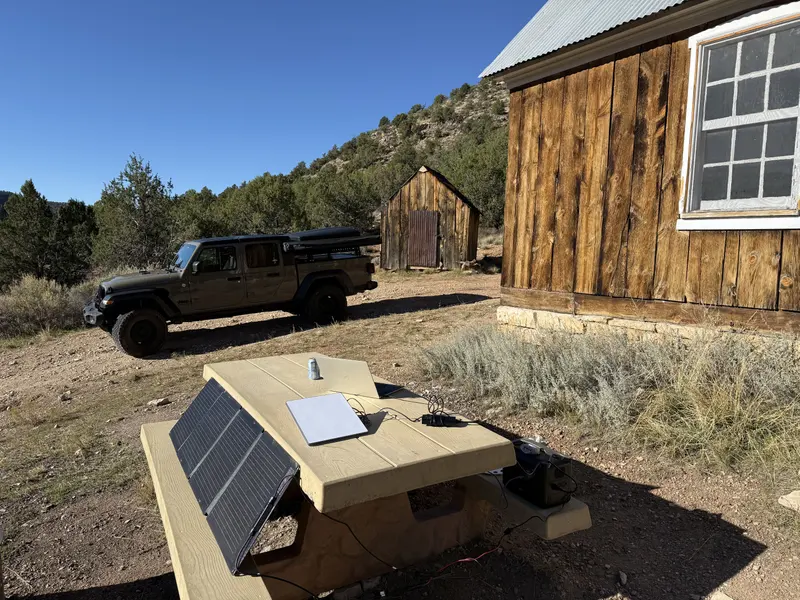
Is it good? The service itself is excellent. At Jumpup Cabin in northern Arizona, a Forest Service cabin with no electricity and no cell service, it was my connection to the outside world (the setup is in the photo further down this page).
A word on the company behind it, since you may be wondering. I am no fan of Elon Musk, and I would rather not be funding his businesses. It frustrates me that a tool this helpful is one of his. But the service is excellent, and for working where there is no signal, that is why it is still in my bag.
How do I avoid paying for Starlink when I'm home?
Use Standby Mode. It keeps your Starlink account and dish active, with only very slow data, for a much smaller monthly fee than a full plan. When you travel, you switch back to a Roam plan for the month. That is how I use it: Roam 100GB for the months I am on the road, standby the rest of the time.
The catch is that the standby price keeps creeping up. In the US it doubled in 2026, from $5 to $10 a month, for new customers in May and for existing customers from June 18 (RV Mobile Internet). Roam 100GB rose at the same time, from $50 to $55 a month. Standby also no longer works while you are moving, as of March 2026.
What does that save? Here's an example, not my own bill. Say you travel three months a year. Three months of Roam 100GB at $55 plus nine months of standby at $10 comes to $255 for the year, compared with $660 for twelve months of Roam 100GB.
Which Starlink plan suits a traveling remote worker?
For use on the move, Starlink sells Roam plans. Residential plans are tied to one address. As of November 15, 2026, the US Roam tiers are Roam 100GB, Roam 300GB and Roam Unlimited. Third-party trackers listed them at $55, $80 and $175 a month in November 2026 (satelliteinternet.com, November 10, 2026). I couldn't confirm those prices on Starlink's own site, and they have moved several times this year, so check starlink.com/roam before you buy.
What changed in 2026
- Global Roam stopped being sold to new customers on July 15, 2026 and ended for existing customers on August 17, 2026 (Starlink help center).
- Roam 100GB and Roam 300GB now work only in your home country or region. To use Starlink abroad on a Roam plan, you need Roam Unlimited.
- Roam Unlimited allows up to 30 days at a time outside your registered home country or region, down from 60 days per trip. Going home resets the count. For longer stays abroad, Starlink points customers to its Priority plans or to moving the service to the new country (RV Mobile Internet, July 15, 2026).
- Before using Starlink outside your registered country or region, you must complete travel registration, an identity check with a government photo ID and a live portrait.
- The United States, Canada and the US territories count as one region, so a US customer driving to a cabin in Canada isn't "abroad." Mexico and the Caribbean are outside it.
Where does that leave you? For most people on this site, working from swaps and cabins at home, a domestic Roam tier is the relevant choice, and the data allowance is the main decision. Video calls are the heavy user.
Starlink Mini or the Standard dish?
From Starlink's own specification sheets (Mini, Standard), checked November 15, 2026:
| Starlink Mini | Starlink Standard | |
|---|---|---|
| Dish size | 298.5 × 259 × 38.5 mm (11.75 × 10.2 in) | 594 × 383 × 39.7 mm |
| Weight | 1.10 kg (2.43 lb) | 2.9 kg (6.4 lb); 3.2 kg (7 lb) with kickstand |
| Average power draw | 25–40 W | 75–100 W |
| Power input | 12–48 V DC, 60 W; or USB-C PD at 100 W (20 V/5 A) minimum with Starlink's USB-C cable accessory | AC power supply |
| Wi-Fi | Built into the dish (Wi-Fi 5) | Separate router |
For a remote worker who moves around, the Mini's size and power draw are the deciding facts. It fits in a laptop bag and uses roughly a third of the Standard's power, which matters a great deal on a battery.
The Standard makes more sense at a fixed spot with mains power. Starlink publishes expected speeds for each on its site, and they vary by location and network load.
I carry the Mini.
Can a portable power station run Starlink?
Yes, if it is sized for it. At the Mini's published average of 25–40 W, eight hours of use is roughly 200–320 Wh, about as much as a laptop. Powering it from the station's USB-C port (at least 100 W) or its 12 V DC output avoids the losses of going through the AC inverter. The Standard, at 75–100 W, needs a much larger battery for a full day. Sizing details and a worked example are in powering Starlink off-grid.
Is it good enough for video calls?
With a clear view of the sky, Starlink generally handles video calls. The usual trouble is obstruction (anything that blocks the dish's view of the sky) rather than speed.
Wait, why did my call freeze when the speed looked fine? Trees are the classic problem at cabins. A dish that sees sky most of the time will still drop out for seconds when a satellite passes behind a branch, and that is enough to freeze a call. Use the obstruction check in the Starlink app before you settle on a spot, and move the dish rather than hoping.
Reaching a home computer over Starlink works too. Satellite adds a little latency, a short delay on every round trip, so the remote desktop feels slightly less snappy. See keeping your home computer reachable.
When is a phone hotspot enough?
Most of the time in towns and cities. Several of my swaps (St. Simons Island in Georgia, Surf City in North Carolina, and Philadelphia) listed internet over 500 Mbps, and in homes like those a hotspot is only a backup for an outage. A hotspot also covers rural places with good cell signal.
So where does Starlink earn its place? Where cell signal is weak or missing, or where the stay itself is the point and the internet is an afterthought: cabins, campsites, a rooftop tent. The stay log shows which stays listed basic internet.
How do I set it up at a rental or cabin?
- Find open sky. Run the obstruction check in the app from a few candidate spots: a yard, a deck rail, a car roof.
- Plan the cable run. The Mini comes with a 15 m (49 ft) cable. Route it so it is not a trip hazard or pinched in a door or window.
- Ask before you mount anything. At someone else's home, a kickstand on the deck is fine, but screws, clamps on gutters and holes in window frames need the host's permission.
- Keep the power station in the shade and close to the dish to shorten the power run.
- Pack it in at the end of the day if weather turns or the spot is public.
My Starlink referral
If you sign up through my link, I get $100 and you get a free month, both after two billing cycles.
- Starlink (referral)
I earn $100 if you sign up through my link, and you get a free month. I earn $100 and you get a free month of service, both after your first 2 billing cycles.
Referral terms as of November 15, 2026. More on how I earn from links in my disclosures. This page also connects to the rest of the setup and to the cabins and tent beyond home swaps.

About the author. Kevin Luten is a long-time remote worker and Kindred home-swap host based in Atlanta. He has hosted 14 guests in his home and works from home swaps, ranger cabins and the occasional hotel. He founded the behavioral-science consultancy Behavior Design Works, is a Cialdini Certified Practitioner, and has spent about 28 years in transportation demand management. He writes Field Office. More about Kevin.