The short answer
A reliable remote-work setup has four layers: a way to reach your home computer and files from anywhere, connectivity you control for when the listing's "fast Wi-Fi" isn't, power for places without outlets, and a small kit that recreates a real desk. Start with the first two, and add power when you go off-grid.
I'm Kevin Luten, and Field Office is where I write up how I work from home swaps, ranger cabins and a rooftop tent. Most of my trips are swaps through Kindred, a members-only club where you lend your home to other members while you are away and stay in theirs when you travel. The ranger cabins are rustic cabins the US Forest Service rents to the public by the night. Why do you need a setup that doesn't depend on the host (the member whose home it is)? My own stays make the case. Across my 8 Kindred stays so far (56 nights, with a ninth booked), the internet speed listed for the home ranged from basic (under 25 Mbps) to over 500 Mbps.
Those are the speeds the listings gave, not ones I measured. Some homes listed a workspace and some did not. Could you plan a work week around a range like that? You can't, so your setup has to cover the bad end.
Each layer below links to a full guide. Listed internet speeds across my stays are in the stay log.
Layer 1: how do I reach my home computer from anywhere?
Leave the home computer on, set it never to sleep, and install Chrome Remote Desktop, Google's free app for using one computer from another, with a strong PIN. Does it run headless, with no monitor attached? Then add an HDMI dummy plug, so the graphics card behaves as if a screen is plugged in and the remote desktop comes through at a proper resolution. Set the BIOS (the firmware settings the computer reads before the operating system starts) to power the machine back on after an outage. Then test it all from another network before you leave.
Picture yourself at a swap hundreds of miles from home, and the file you need never synced. This layer is what lets you grab it. It also lets you use software that only lives on the desktop, and keep a long job (an AI process, a render, a big download) running at home while you are away. The full how-to, with Windows and Mac settings, is in keep your home computer on and reachable from anywhere.
Layer 2: what if the Wi-Fi is bad where I'm staying?
Read the listing closely before you book. Is there a stated speed? A listed workspace? Does the host mention video calls?
Wait, does "Wi-Fi available" mean 25 Mbps or 500? With no number, it is a question to ask the host, not an answer.
Then carry a backup you control:
- A phone hotspot is the cheapest backup, and it covers most town and city stays with decent cell signal. Check your plan's hotspot allowance before you rely on it.
- Starlink, SpaceX's satellite internet service, makes sense when you regularly work from places with weak or no internet and weak cell signal (rural swaps, cabins, a rooftop tent). It needs power and a clear view of the sky, and its travel plans changed in 2026. See Starlink for unusual places.
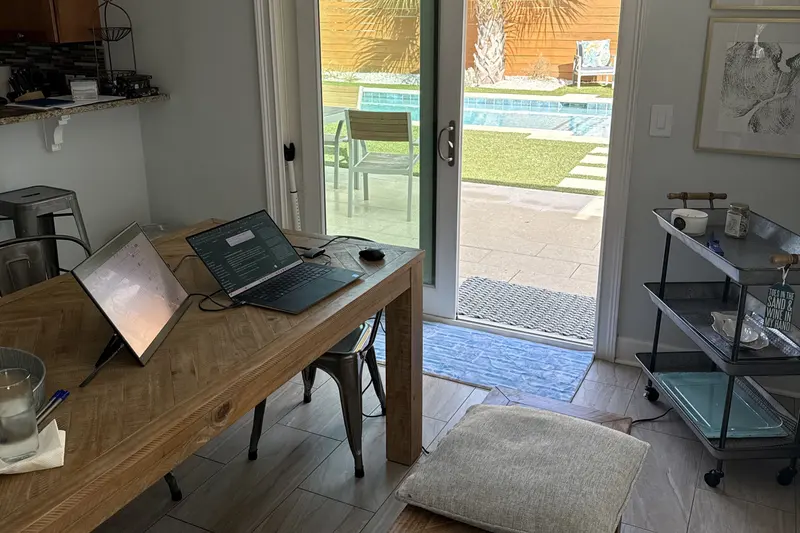
What do I set up first? The desk, and it is almost always the dining table. Listed "workspaces" tend to be small desks in a corner, facing a wall, so I work where the light and the view are. More in what I look for in a listing.
Layer 3: what power do I need without an outlet?
Picture a cabin with no outlets and a full workday ahead of you. A portable power station (a big rechargeable battery with outlets and USB ports) charged by a folding solar panel covers it. Size the station by adding up your daily watt-hours, the energy your laptop, monitor and any connectivity gear use in a day. Charge laptops over USB-C where you can, and pick a panel that refills what you use.
I use a power station from EcoFlow's River series and a solar panel from Goal Zero, two brands of portable power gear. The sizing method, with worked example numbers, is in off-grid power for remote work.
Layer 4: what goes in a desk in a bag?
The kit recreates a real desk at a kitchen table. It is a portable monitor made by InnoView for a second screen, a CUKTECH 15 Ultra power bank (a pocket battery, 20,000 mAh, up to 140 W from one port) that can charge a laptop, and a carry-on suitcase from the luggage brand Away to hold it all. One piece stays home: the HDMI dummy plug on the headless home PC. You will find each item, and why it is there, in my travel kit.
Which setup for which kind of trip?
Does every trip need every layer? No. Here is how the layers map to the kinds of places on this site.
| Trip type | Layers that matter most | Why |
|---|---|---|
| City swap with fast listed Wi-Fi | 1 and 4 | The internet is usually fine; you need your files and a proper screen. |
| Coastal or rural swap listing basic internet | 1, 2 and 4 | Bring your own connectivity: hotspot first, Starlink if cell signal is weak. |
| Ranger cabin | All four | Often no power and no internet, so you carry both. |
| Rooftop tent | All four, kept light | Power and connectivity come with you; space is tight. |
My own loadouts split by how I travel. Flying, everything fits in an Away carry-on: laptop, the InnoView portable monitor, the CUKTECH power bank, a keyboard and mouse. Driving the Jeep, I add a 32-inch monitor, a standalone webcam, the EcoFlow RIVER Pro power station, the solar panel, Starlink and the portable fridge. Details are in the travel kit.
More on cabins, the tent and how they fit around swaps is in beyond home swaps. A short version of this page lives in the quick answer on working from a home swap.
What should I buy first?
The first layer costs almost nothing. Chrome Remote Desktop is free, and a dummy plug is a small purchase. The second layer can be the phone already in your pocket.
Power and Starlink are the big spends. They are only worth it once you are heading somewhere that needs them.
Leave your email for a note when a new setup guide goes up, or ask a setup question.

About the author. Kevin Luten is a long-time remote worker and Kindred home-swap host based in Atlanta. He has hosted 14 guests in his home and works from home swaps, ranger cabins and the occasional hotel. He founded the behavioral-science consultancy Behavior Design Works, is a Cialdini Certified Practitioner, and has spent about 28 years in transportation demand management. He writes Field Office. More about Kevin.